
Smart Contact Management for Better Customer Conversations



Understanding Contact Management in vGrowCRM
Everyday Contact Management Features

Centralized Multiple Contact Management

Manage Multiple Contacts Easily
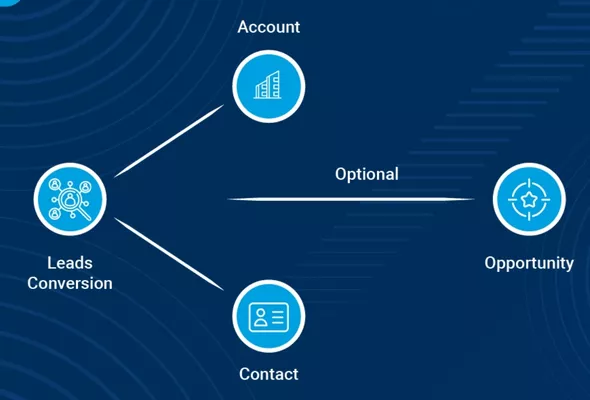
Sales Opportunities Linked to Accounts

Advanced Role Based Security System
Administrators control viewing, editing, and management rights by role, ensuring sensitive contact data stays protected across departments, teams, and different user access levels.

Efficient Smart Contact Search
Contacts can be found instantly using search by name, phone, email, city, company, role, or owner, saving valuable time for teams during sales, service, and customer support operations.

Dynamic Custom Contact Fields
Custom fields allow tracking business-specific data like interest level, referral source, department type, KYC status, or any other information required for internal business processes and workflows.

Complete Contact Storage

Duplicate Contact Control

Unified Communication Tracking
Keeping Contact Data Reliable
When multiple team members handle customer information, records can quickly become inconsistent or outdated. vGrowCRM prevents this by keeping all updates unified and tracking every change across departments. Role based access ensures only authorized users modify sensitive data. Because updates reflect instantly throughout the system, everyone works from the same accurate information. This keeps contact records organized, reliable, and ready for daily business operations use.

Why Businesses Trust vGrowCRM
- Full communication context before every interaction
- No duplicate contacts or lost information across teams and systems
- Stronger long term customer relationships built through consistent communication
- Clean and centralized contact records for easy access and control
- Better coordination between sales, service, and management
- Faster and more accurate customer responses across calls, messages, follow-ups
Why Accurate Contact Data Matters
- Teams avoid asking the same questions again and again.
- Communication feels more personal and well prepared.
- Fewer mistakes happen due to outdated phone numbers or emails.
- Customers feel valued when their history is remembered properly.
- Consistent records lead to longer and more trusted relationships.
- Customers experience smoother calls when their information is already correct.
Contact Management Help FAQ's
Does vGrowCRM support multiple contacts under one account?
Yes, you can add unlimited contacts under a single account and assign individual roles, preferences, and responsibilities, keeping every stakeholder mapped clearly within one customer record for better coordination daily.
Are contacts linked to multiple opportunities and activities?
Yes, contacts can be connected to multiple opportunities, tasks, and follow-ups, allowing your team to track parallel deals, related actions, and progress from one unified contact profile easily each day.
Does vGrowCRM record call, email, and WhatsApp history automatically?
Yes, once integrated, all calls, emails, and WhatsApp messages are logged automatically under the contact, giving your team a complete history of conversations without any manual updates required at all.
How flexible are contact fields in vGrowCRM?
Yes, you can add, edit, reorder, and adjust custom contact fields to match your workflow, industry needs, compliance requirements, and internal data standards across teams for better accuracy and reporting.
Is contact information protected and secure?
Yes, contact data remains secure through role based access controls, ensuring only authorized users can view, edit, or manage sensitive information across departments with clear accountability and compliance support built in.